Without the pluginYou add each new arrival to WordPress as well as to Autotrader, and remember to update it later.
With the pluginYour stock is imported from Autotrader automatically, every 8 hours.
WordPress plugin · reads your stock from the Autotrader UK Stock API
The plugin connects your WordPress site to your Autotrader account. It imports your forecourt stock through the Autotrader UK Stock API and turns every vehicle into a native page with its own URL, gallery, specification table and structured data, with filters, shortcodes and a vehicle sitemap. Stock refreshes automatically every 8 hours, so nobody types a car in twice.
You need an Autotrader dealer account with a Trade package. Autotrader has to enable API access for your Advertiser ID before the first sync: a short email, usually activated within a few hours on business days.
 100% 5-star reviews
Trusted by over 1,000 website owners
100% 5-star reviews
Trusted by over 1,000 website owners

Before you start reading
Autotrader WordPress Integration PRO is a WordPress plugin from Devikit that connects a dealer website to the Autotrader UK Stock API through Devikit's secure proxy. It imports your stock and builds a vehicle listing plus a native page for every vehicle on the site you already own.
The plugin comes in one version, PRO, with no free edition. A licence covers one website and one Advertiser ID. It syncs stock 3 times a day, adds SEO-friendly URLs, Vehicle and Offer JSON-LD, a vehicle XML sitemap, filters, six shortcodes with Gutenberg blocks, a gallery with lightbox and a specification table.
Looking for an Autotrader WordPress plugin or an Autotrader.co.uk WordPress integration for your own dealer website? Below you will find the features, a link to the live demo, pricing, a comparison with the other routes to Autotrader stock and answers to the most common questions.
Why this plugin
Your stock lives in your Autotrader account. The plugin reads it from the Autotrader UK Stock API and builds the pages on the WordPress site you already own, so the website and the forecourt say the same thing.
Without the pluginYou add each new arrival to WordPress as well as to Autotrader, and remember to update it later.
With the pluginYour stock is imported from Autotrader automatically, every 8 hours.
Without the pluginSold cars stay on the site until somebody removes them.
With the pluginSold vehicles leave the main listing at the next sync, and a shortcode can show previously sold stock if you want it.
Without the pluginStock shown in an iframe is not part of your own pages.
With the pluginEvery vehicle is a native WordPress page with its own URL, Vehicle and Offer JSON-LD and an entry in a vehicle sitemap.
How it works
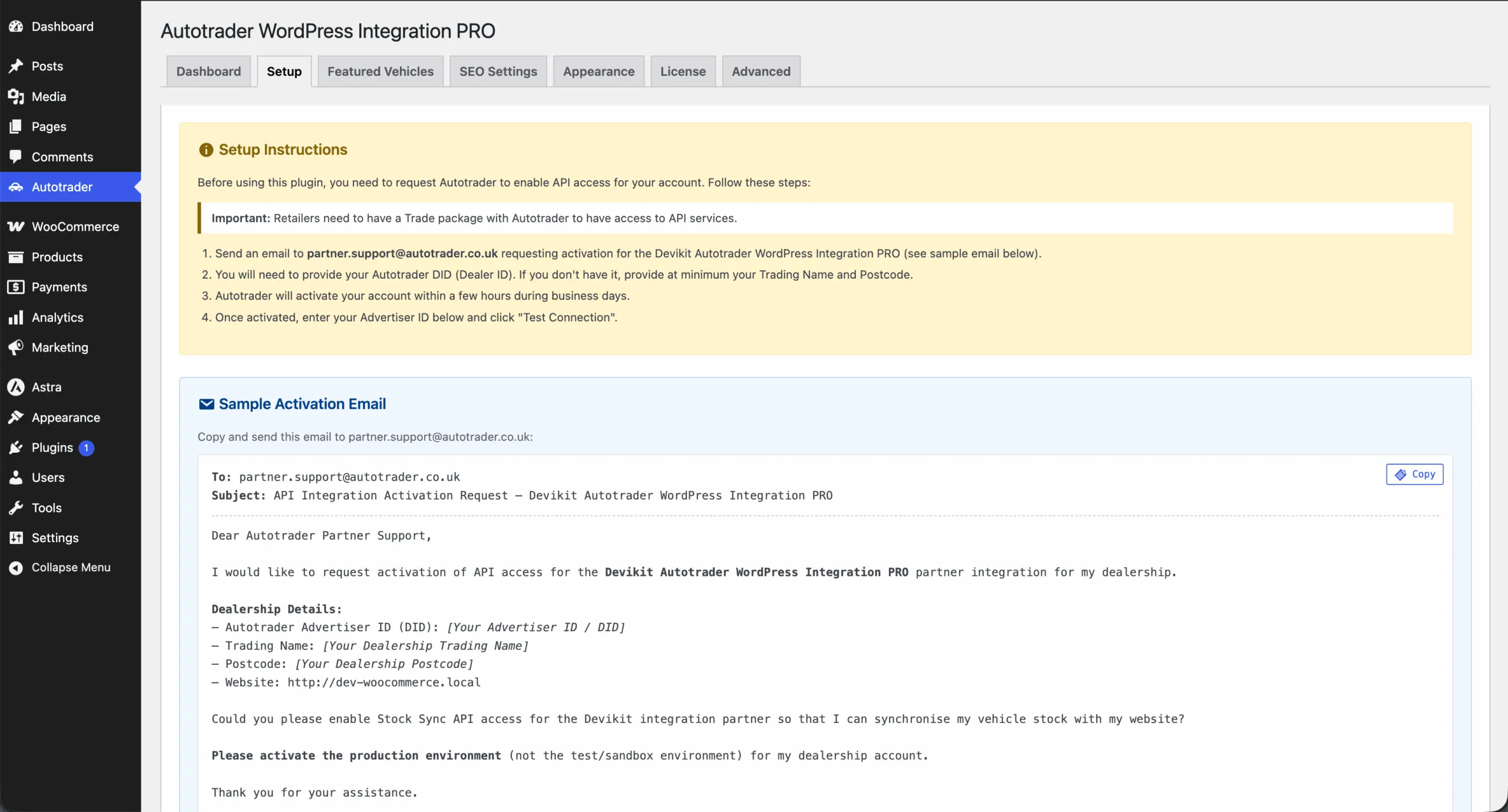
Email partner.support@autotrader.co.uk with your Advertiser ID, or your trading name and postcode. Autotrader activates the account, usually within a few hours on business days. The plugin's Setup tab has the email ready to copy.
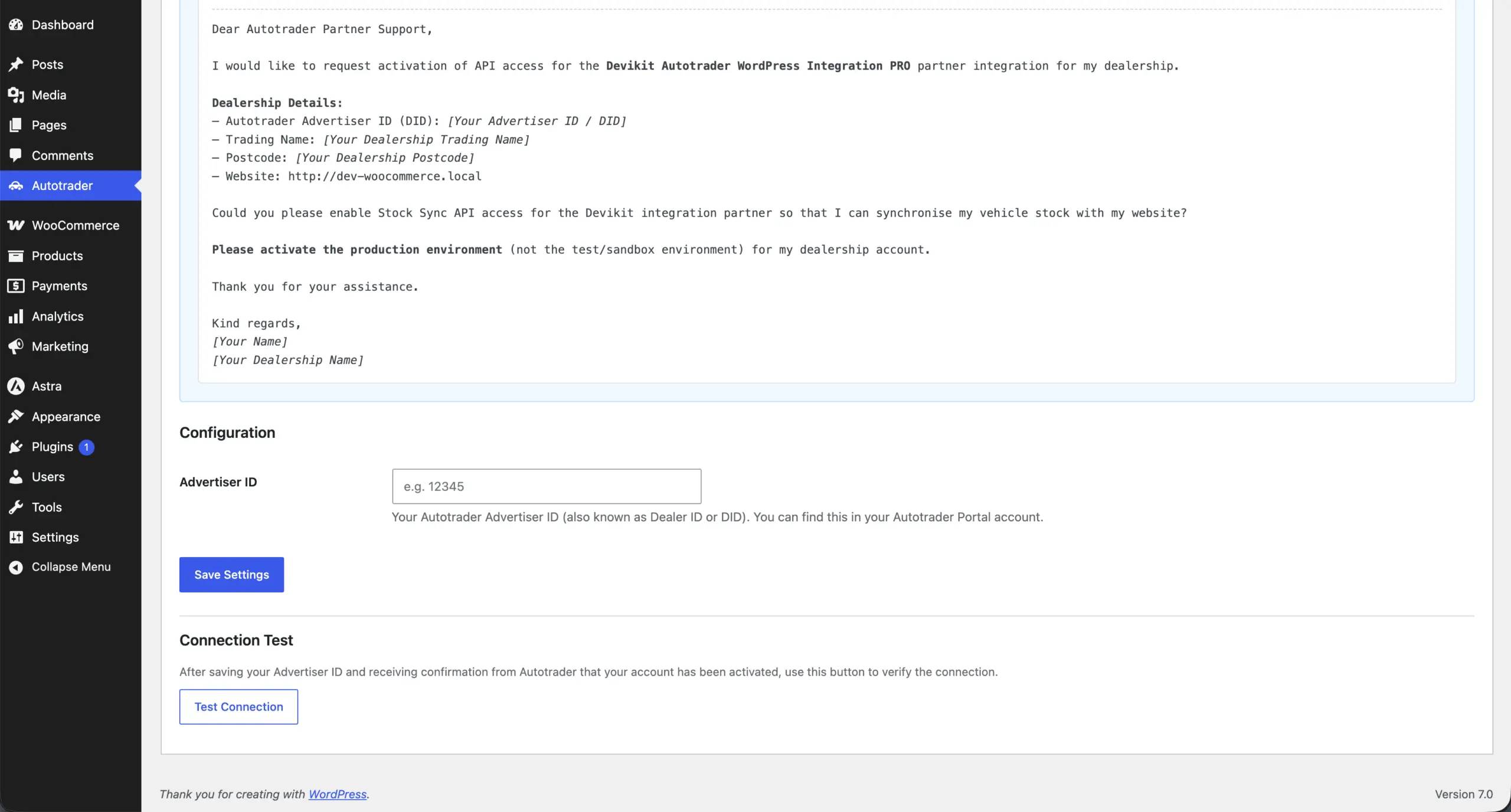
Install the plugin, activate your licence, enter your Advertiser ID on the Setup tab and click Test Connection. No API keys are stored on your site.
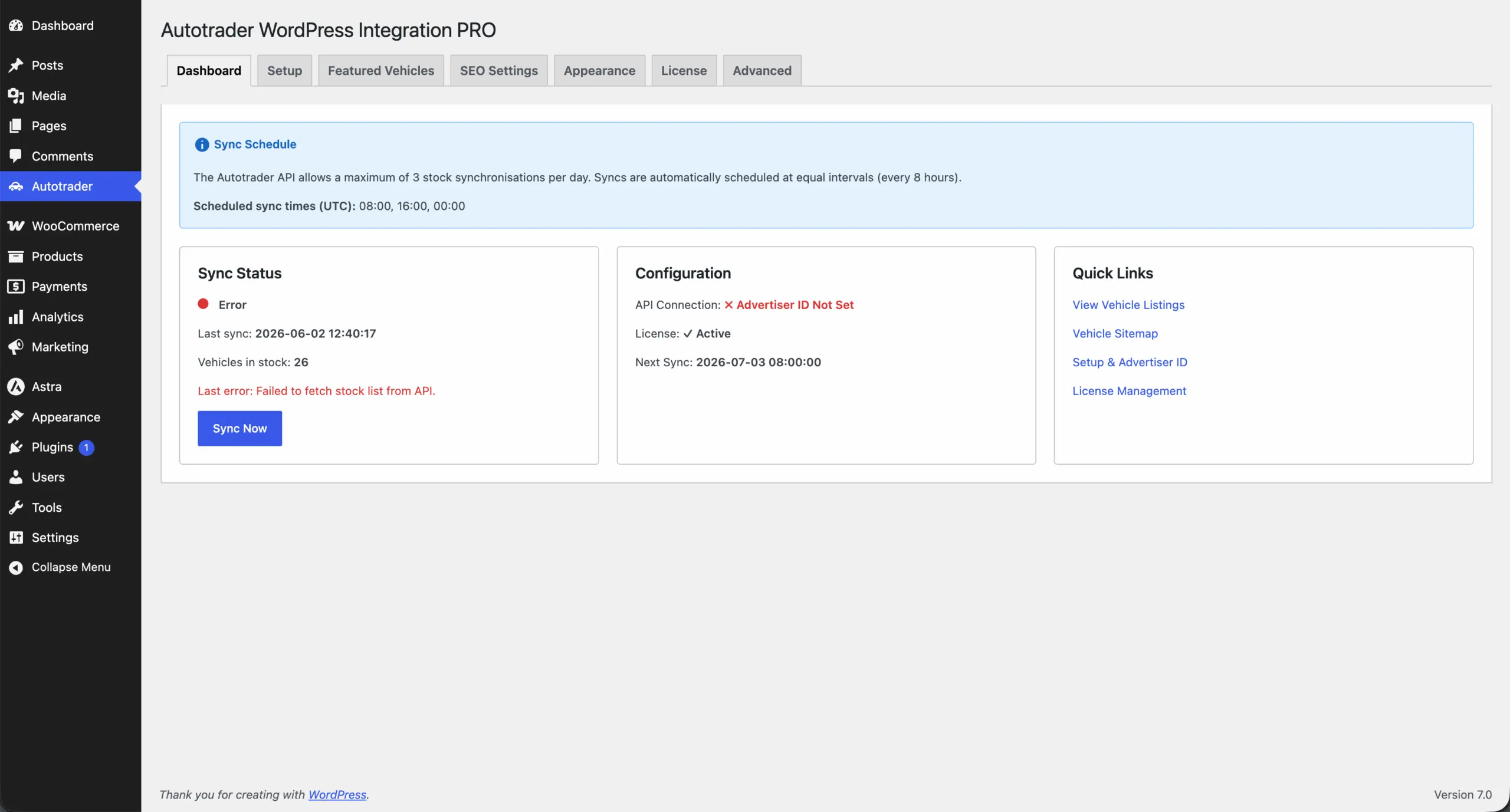
Click Sync Now once, then WP-Cron fetches your stock every 8 hours. If Autotrader returns an error, the vehicles already on your site stay in place.
They get a listing at /vehicles/, a page for every vehicle, filters, a gallery, a specification table and an enquiry sidebar with your phone number and email.
Features
From the stock sync, through the listing and the vehicle pages, to SEO output and the controls in the admin. Everything below is part of the PRO licence.
The plugin fetches your stock from the Autotrader UK Stock API on a fixed schedule and keeps what is already on your site safe if something goes wrong.
Each vehicle is a native WordPress page, not an iframe. The SEO layer is configurable and works with the SEO plugin you already use.
Show your stock on the built-in /vehicles/ page or place it anywhere with a shortcode or a Gutenberg block.
The detail page shows what Autotrader supplies for the vehicle, in a layout that inherits your theme's fonts.
Photos come straight from Autotrader, so a stock of hundreds of cars does not weigh down WordPress.
You can see what the plugin did and why something failed, and you keep full control of the look.
The illustrations in the cards are simplified and use the plugin's own labels. Every option is described in the documentation.
Screenshots
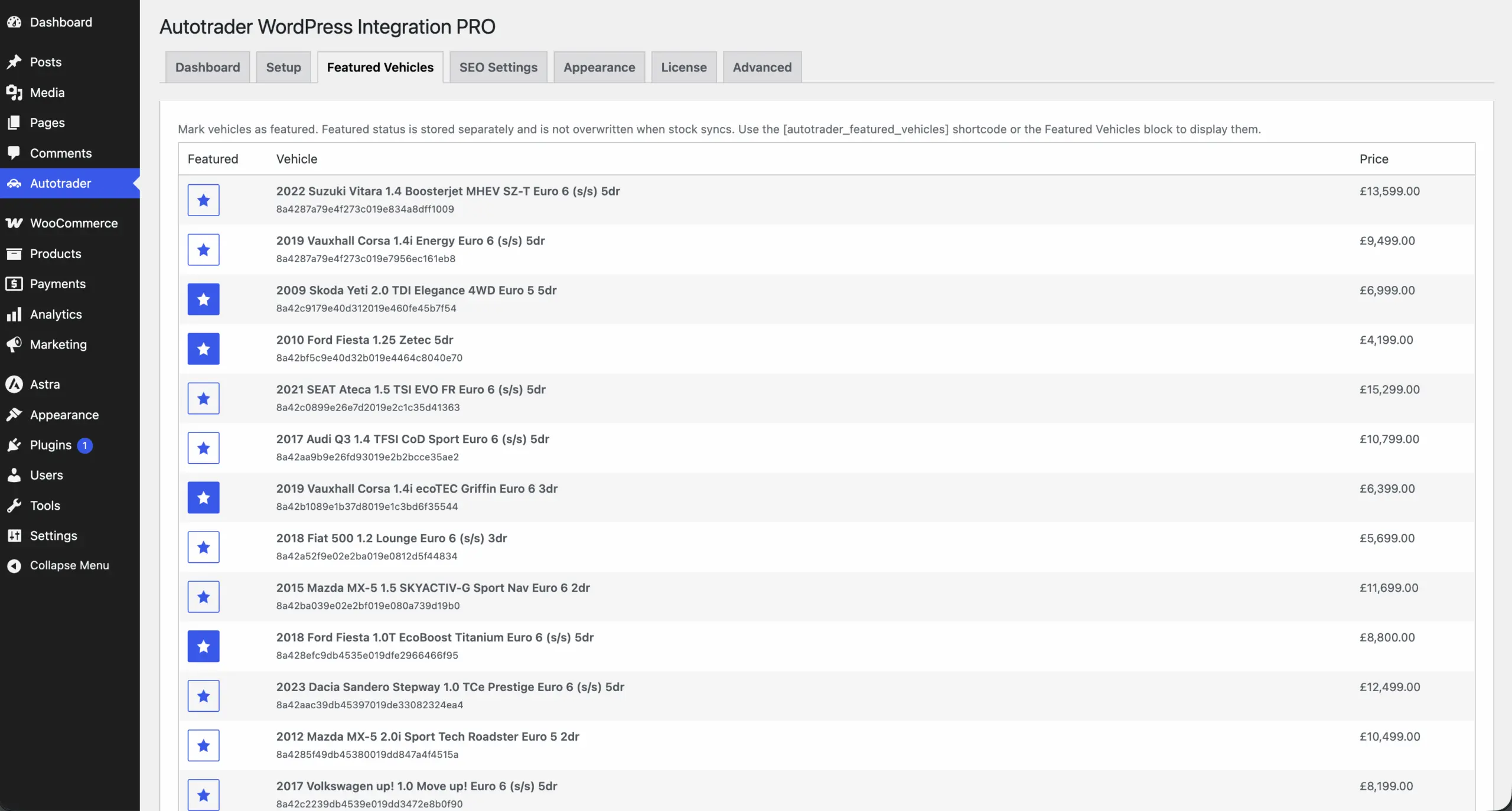
These are the screens from the Autotrader WordPress Integration PRO product page: the WordPress admin tabs, not a mock-up.
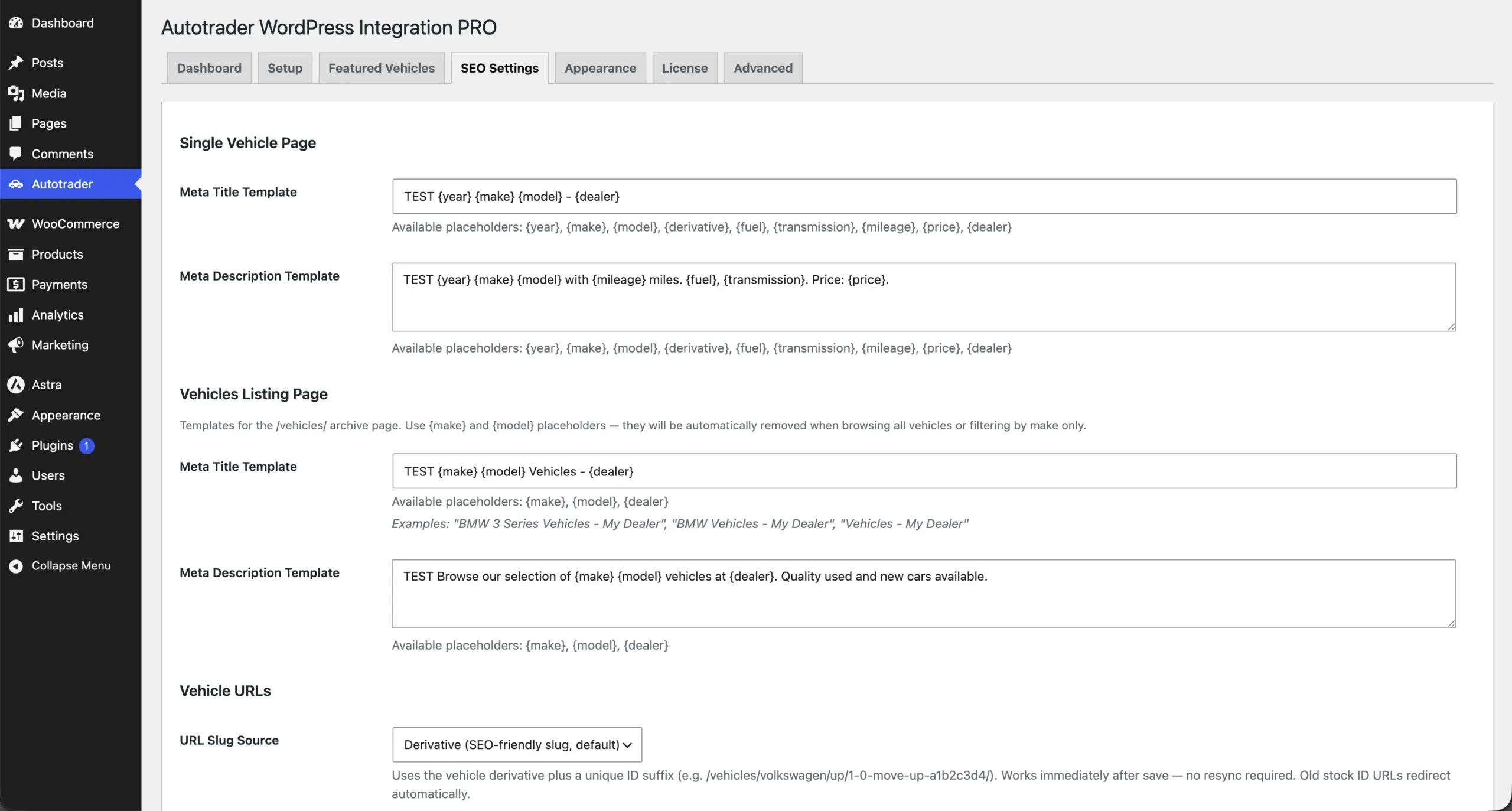
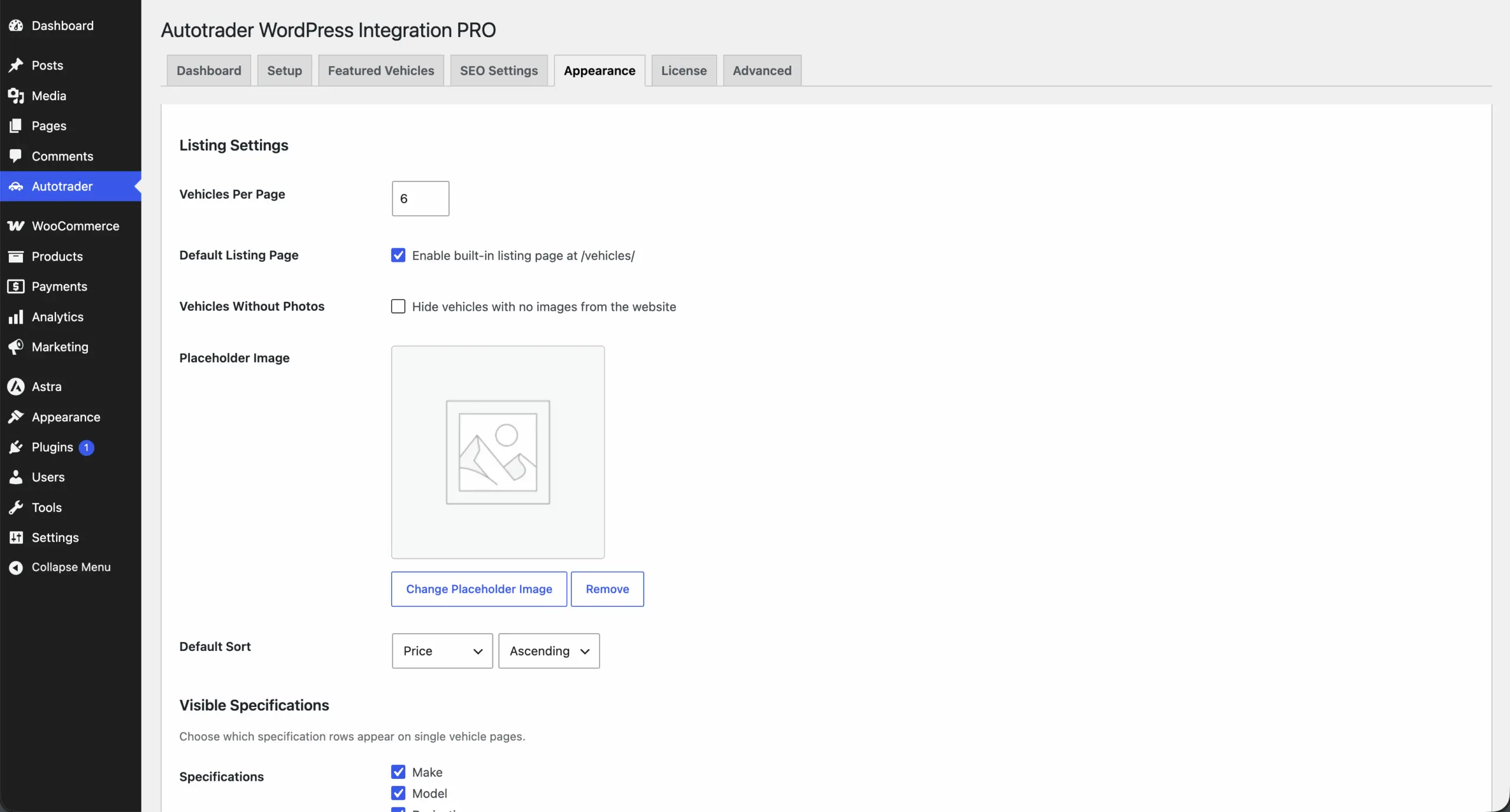
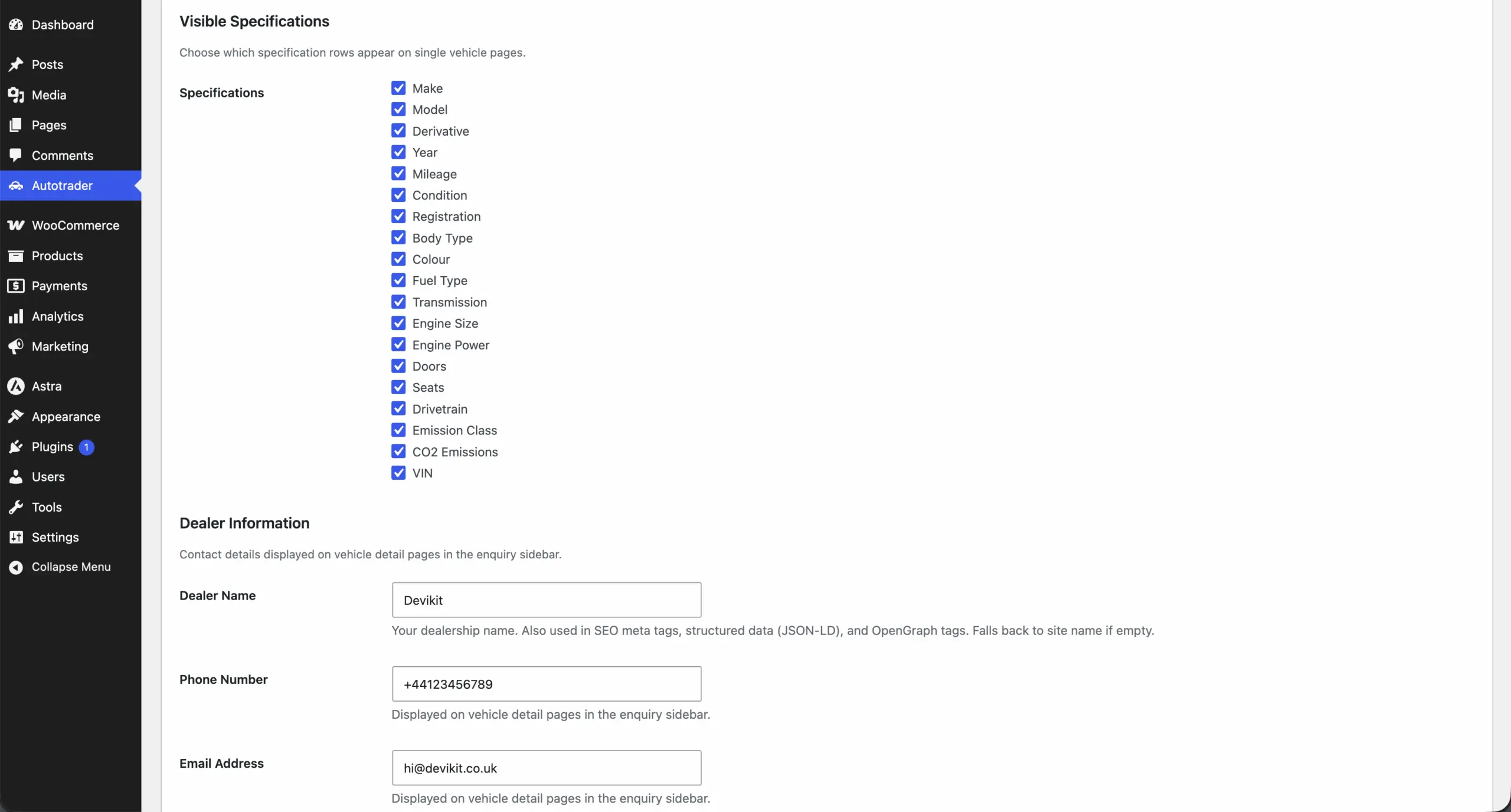
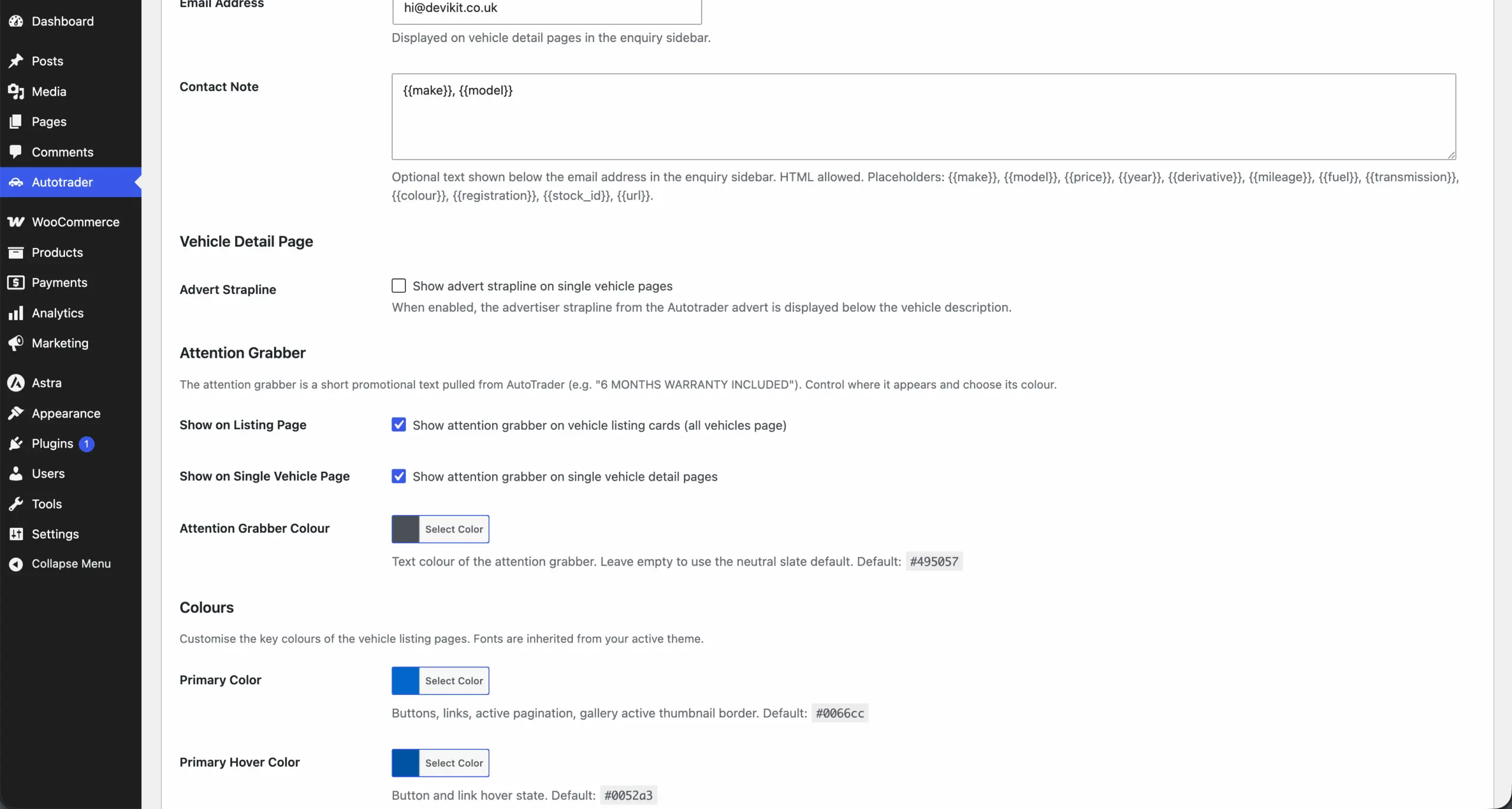
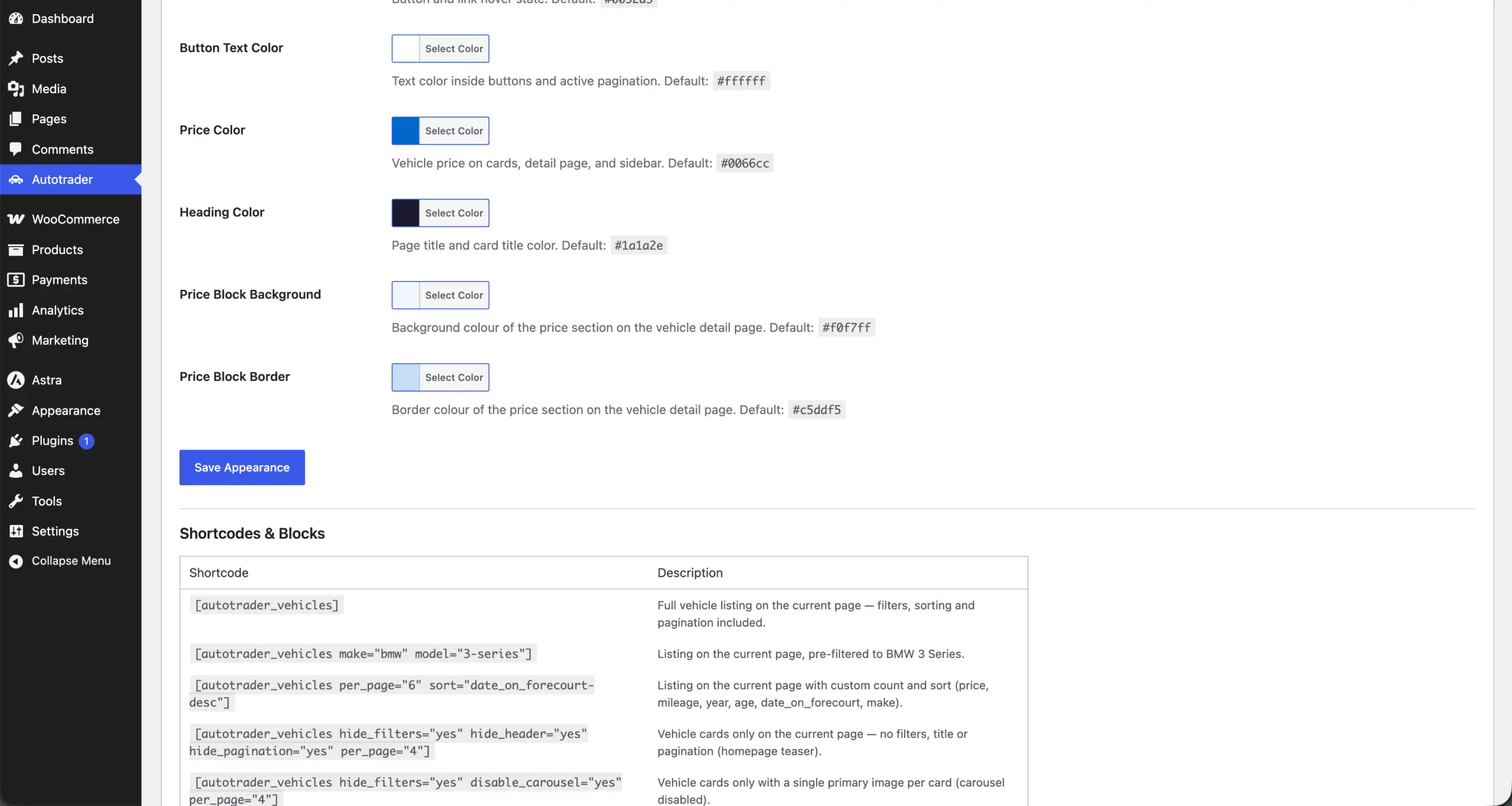
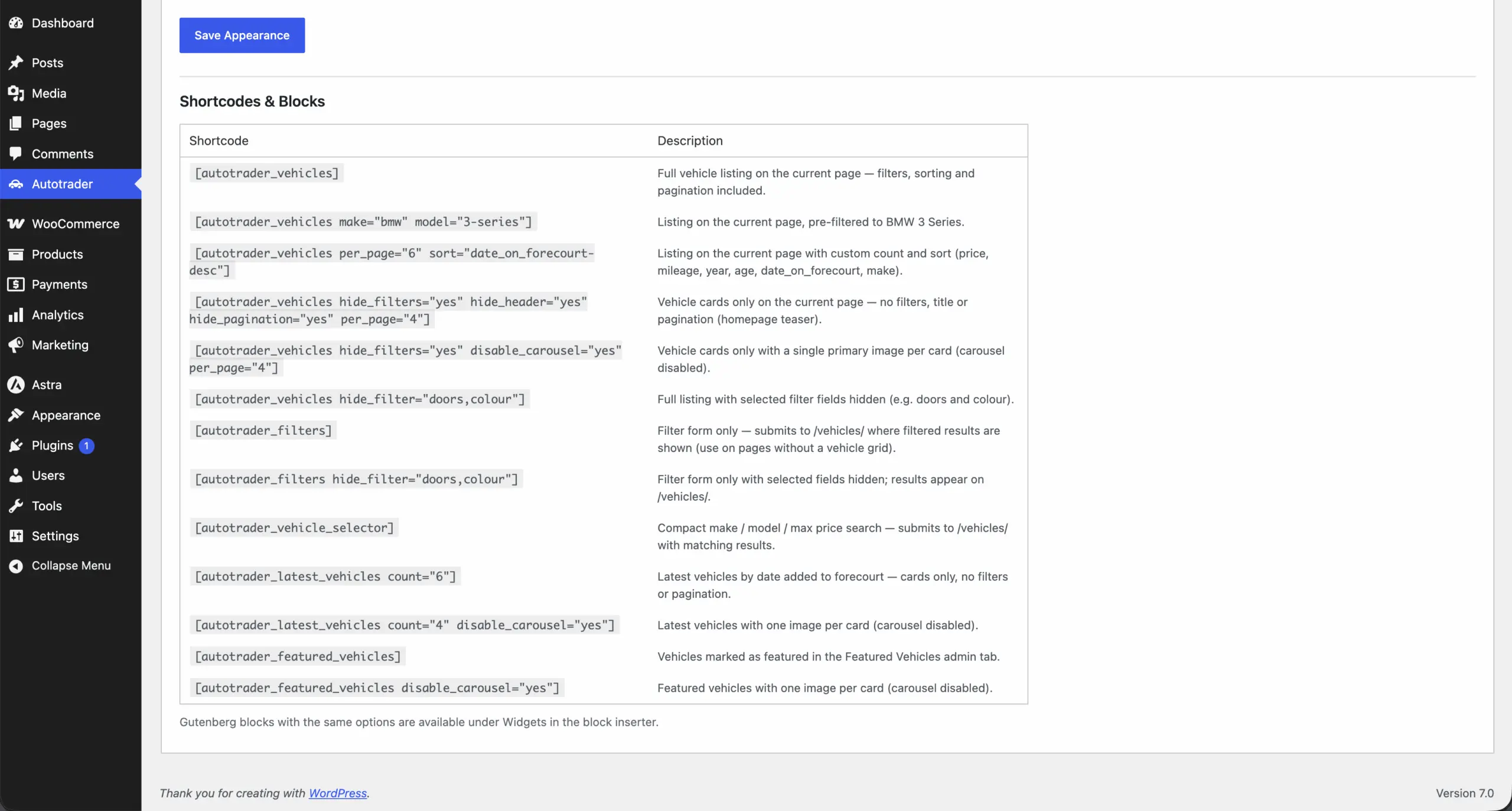
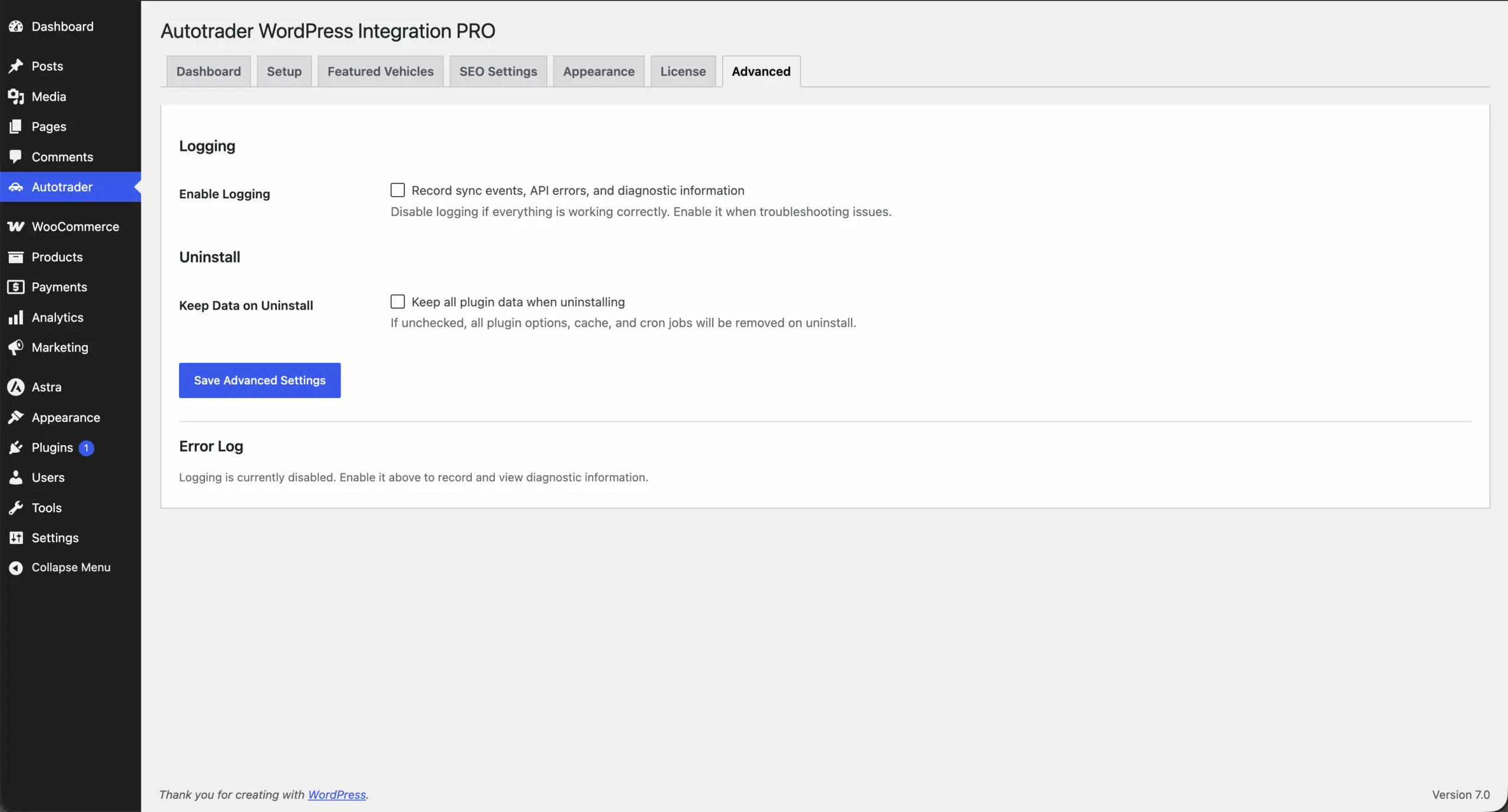
Live demo
Devikit runs the plugin on a demo site. There is no free version to install, so the demo is the quickest way to see what your visitors get.
The demo uses a demo theme. On your site the plugin takes its fonts from your theme and its colours from the Appearance tab.
Video
In just over three minutes the video walks through connecting your dealership website to Autotrader, syncing stock automatically, how listings and vehicle pages are built, SEO with JSON-LD, meta tags and the sitemap, filtering, the shortcode, colours, logs and the connection status.
Reviews
Trusted by over 1,000 website owners. The first review is about this plugin, the rest are about working with Devikit and our plugins.
100% 5-star reviews
Amazingly fast help and support. Very well-designed Autotrader WordPress plugin which is easy to setup and customise. Highly recommended!
Amazing technical support, reported problems are resolved at an express pace. Highly recommended!
Highly recommended!!!
Exemplary cooperation
A partner worth recommending. Great cooperation, meets deadlines and contract terms. Offers ongoing support. Highly recommended.
The only company I've come across that has proper Customer Service. (Apart from mine, too) :)
Highly recommended, very professional company and excellent communication.
Highly recommended, 100% professional service
Excellent service, highly recommended.
Very efficient, always supportive. Professional and effective.
I am very satisfied. I highly recommend. A huge advantage is the commitment and professional advice.
Before you buy
A short answer to what is worth knowing before you add PRO to your basket.
A dealer account with a Trade package and your Advertiser ID. Autotrader also has to enable API access for the Devikit integration on your account. You email partner.support@autotrader.co.uk, and Autotrader activates it, usually within a few hours on business days.
There is no free version. You can open the live demo, watch the video and read the documentation. If the plugin does not suit you, send us an email within 30 days and we will refund you, no questions asked.
Stock syncs 3 times a day, every 8 hours, which the documentation gives as the maximum the Autotrader API allows. If your stock turns over several times a day, a real-time integration will be faster. The comparison below says so plainly.
PRO licence
One version and one price. The PRO licence covers one website and one Advertiser ID, includes 12 months of updates and priority email support, and you have 30 days to ask for a refund.
What you need from Autotrader
Section 3 of the documentation has the activation email
For dealers with a WordPress site
PRO Autotrader WordPress Integration
£199.00 £169.00ex. VAT / year · 1 website
The button adds the plugin to your basket · 30-day refund
Sync schedule
The plugin refreshes your stock 3 times a day, every 8 hours, with WP-Cron. The documentation gives this as the maximum frequency the Autotrader API allows.
It is a known limit: real-time integrations through Autotrader Connect update faster. Weigh it against how quickly your stock turns over.
The sync in one fact
Who it's for
You already have a site you like and an Autotrader account. The plugin adds your stock to it without a rebuild or a migration.
Native pages with Vehicle and Offer JSON-LD and a vehicle sitemap on your own domain, instead of stock shown in an iframe.
Template overrides in your theme, colour settings, shortcodes and Gutenberg blocks. One licence covers one site and one Advertiser ID.
Every front-end and admin string is translation-ready, and the plugin works with WPML, Polylang and Loco Translate.
You keep creating adverts in Autotrader. The plugin only reads from it, so there is nothing to enter twice and nothing is pushed back.
The make and model dropdowns show how many vehicles each option has, and the shortcodes can pre-filter a listing to one make or model.
What it builds
From your stock the plugin creates a listing, a page for every vehicle and the technical files search engines expect.
Autotrader access
Autotrader keeps its stock data behind Autotrader Connect, its API platform, and access is gated. Whatever you buy, API access has to be enabled for your Advertiser ID, and retailers need a Trade package to use Autotrader's API services. Autotrader's own page explains how Connect works.
For this plugin that means one email to Autotrader, and then a connection test in the plugin. The plugin reads your stock and does not publish anything back to Autotrader.
What the plugin does, and what Autotrader does
Comparison
Every route to your Autotrader stock still needs an Autotrader dealer account, and none of them replaces your advertising package. The comparison is based on Devikit's public comparison from August 2026.
| Criterion | Autotrader Dealer Website | MotorDesk + WordPress plugin | Devikit PRO |
|---|---|---|---|
| What you actually get | Hosted website supplied by Autotrader | Dealer platform with a free WordPress connector | Plugin for your own WordPress site |
| Runs on your own WordPress | No | Yes | Yes |
| Separate platform subscription needed | Part of your Autotrader account | Yes, a MotorDesk plan | No |
| Published price | Not published | From £79 / month (5 vehicles) | £169.00 ex. VAT / year |
| Autotrader Trade package required | Yes | Yes | Yes |
| Where you manage stock | Autotrader Portal | MotorDesk | Autotrader Portal |
| Update frequency | Real time via Autotrader Connect | Within a minute of a MotorDesk change | 3 times a day, plus manual sync |
| Vehicle pages on your own domain | Yes | Yes | Yes |
| JSON-LD Vehicle + Offer schema | Not documented publicly | Not documented publicly | Yes |
| Dedicated vehicle XML sitemap | Not documented publicly | Not documented publicly | Yes, /sitemap-vehicles.xml |
| Yoast SEO / Rank Math hooks | Not applicable | Not documented publicly | Yes |
| Shortcodes and Gutenberg blocks | Not applicable | One shortcode, no blocks | Six shortcodes with matching blocks |
| Theme template overrides | No | Yes | Yes |
| Where images are served from | Autotrader | MotorDesk | Autotrader CDN, not copied into WordPress |
| Enquiry handling | Built in, with lead reporting | MotorDesk forms embedded via iframe | Contact details in the vehicle sidebar |
| Wider DMS features (CRM, billing, other portals) | Limited | Yes | No |
Sources: Devikit's comparison of 10 August 2026, Autotrader's pages on Autotrader Connect and its Dealer Websites help section, MotorDesk pricing and the Devikit documentation. “Not documented publicly” means the vendor's public material does not describe the feature, not that it is confirmed missing. MotorDesk is billed monthly and Devikit PRO yearly, so the prices are not directly comparable. The Devikit price shown is the current price on devikit.co.uk. Spotted an inaccuracy? Email hi@devikit.co.uk.
your stock turns over several times a day. They update in real time through Autotrader Connect, while this plugin syncs 3 times a day, and that is its clearest limitation. It is also the easier route if you have no website yet: the Dealer Website is integrated by default and you already have the relationship with Autotrader.
you want stock, leads and other portals in one system. Its WordPress site updates within about a minute of a change and enquiries land in its Leads and Chat tool. It is a monthly platform from £79 and it is your stock master, pushing to Autotrader. Devikit PRO has no CRM, no feeds to other portals and no publishing back to Autotrader.
you already have a WordPress site and want native, indexable vehicle pages with Vehicle and Offer schema and a vehicle sitemap on your own domain, for an annual licence rather than a monthly platform. Remember that it syncs 3 times a day, reads from Autotrader instead of writing to it, and serves one Advertiser ID per site.
Installation
Once Autotrader has activated API access, setup takes a few minutes. Below is the short version, and the documentation describes every screen.
FAQ
Yes. Autotrader WordPress Integration PRO from Devikit connects a WordPress site to the Autotrader UK Stock API and builds native vehicle pages from your stock. In Devikit's public comparison from August 2026 the main alternatives are Autotrader's own hosted Dealer Website and a dealer platform such as MotorDesk, which has a WordPress connector and a monthly plan.
Yes. You need a valid Autotrader UK dealer account with a Trade package, and your Advertiser ID (DID). Autotrader must also enable API access for the Devikit integration on your account. The plugin licence does not replace your Autotrader package.
Email partner.support@autotrader.co.uk and ask for activation of the Devikit Autotrader WordPress Integration PRO, with your Advertiser ID or, if you do not have it, your trading name and postcode. Autotrader activates the account within a few hours on business days. Ask for the production environment, not the sandbox. The plugin's Setup tab has a ready-made email you can copy, and section 3 of the documentation has a sample.
No. The Autotrader credentials are managed by Devikit's secure proxy server. You enter only your Advertiser ID, and nothing else is stored on your site.
Your Advertiser ID, also called DID or Dealer ID, is in your Autotrader Portal account. If you cannot find it, contact Autotrader support with your trading name and postcode.
Stock is synchronised 3 times a day, every 8 hours, with WP-Cron. The documentation says this is the maximum frequency the Autotrader API allows. You can also click Sync Now on the Dashboard, but a manual sync counts towards the same daily limit of 3. If your stock turns over several times a day, a real-time integration will be faster.
No. Autotrader WordPress Integration PRO is the only version and there is no free edition. You can look at the live demo and the video, read the documentation, and ask for a refund within 30 days if the plugin does not suit you.
The PRO licence costs £169.00 ex. VAT per year at the current special price, instead of the regular £199.00 ex. VAT, and the special price runs until 15 October 2026. It covers one website, 12 months of updates and priority email support. Buying several licences or Devikit plugins in one order earns a volume discount, from 10% for two to 50% for ten or more. Your Autotrader package is paid separately to Autotrader.
All plugin features need an active licence, including the updates. Renew it to keep the sync and the vehicle pages working as before. The price you pay stays locked for as long as your subscription remains active.
Yes. The plugin passes custom meta titles, descriptions, canonical URLs, OpenGraph and Twitter Card tags to both through their filter hooks, and adds the vehicle URLs to their sitemap indexes. If neither is installed, the plugin outputs its own meta tags.
Yes. It creates /sitemap-vehicles.xml with all vehicle pages and the listing pages, registers it in your robots.txt and adds it to the Yoast SEO or RankMath sitemap index when either is active.
Every vehicle page outputs JSON-LD with the Vehicle and Offer types: name, make, model, year, mileage, fuel type, transmission, body type, colour, engine displacement, VIN, price, currency, availability, the dealer, the image and, when Autotrader provides it, a price indicator.
No. Images are served from Autotrader's CDN, so they do not fill your Media Library or your disk space. The plugin uses lazy loading, srcset, CDN size presets and priority loading for the main image.
No. Each installation is designed for a single dealer with one Advertiser ID. If you have several sites or several Advertiser IDs, you need a licence for each site.
Yes. The plugin is theme-agnostic: it inherits your fonts and global styles, you can set the main colours in the Appearance tab, and you can override any template by copying it to an autotrader-integration-pro folder in your theme.
Sold vehicles stay out of the main /vehicles/ listing. By default their pages return not-found. You can switch on Sold Vehicle Pages to keep them viewable, and the [autotrader_sold_vehicles] shortcode lists previously sold stock with a Sold badge.
The vehicles already on your site are kept, and the cache is cleared only after a successful response. The plugin follows Autotrader's Go Live requirements: it does not retry a 400, stops on 401 and 403, waits and retries after 429 and 503, and retries 5xx errors up to 3 times with exponential backoff. The error is logged and shown on the Dashboard. A 403 means your Advertiser ID has not been activated for the Devikit integration yet.
Yes. In Autotrader → Appearance → Listing Settings, switch off Default Listing Page. Individual vehicle pages keep working, and you can show listings anywhere with the [autotrader_vehicles] shortcode or the matching Gutenberg block.
Each vehicle page has an enquiry sidebar with your dealer name, a clickable phone number, a clickable email address and an optional contact note. It is a set of contact details, not a lead management system. The plugin does not publish anything back to Autotrader and has no CRM.
Yes. All user-facing strings use WordPress translation functions, a .pot file is included, and the plugin is compatible with WPML, Polylang and Loco Translate.
WordPress 6.0 or newer, PHP 7.4 or newer, an Autotrader dealer account with a Trade package, your Advertiser ID, API access enabled by Autotrader for the Devikit integration, and a valid licence key.
No. The plugin is an independent product of Devikit LLC. Autotrader and WordPress are trade marks of their respective owners, the names are used only to show compatibility, and Devikit LLC is not affiliated with Autotrader.
The documentation describes every tab and shortcode. Email your questions to hi@devikit.co.uk, and we usually reply within a few hours. PRO customers get priority email support.
Keep reading
Add PRO to your basket straight away. Once Autotrader has enabled API access, you can have your listings live in minutes, and if the plugin does not save you time, we refund you within 30 days.
30-day refund · priority email support with PRO · hi@devikit.co.uk
Cookies
We use cookies to remember your choice and to measure traffic on the site. Analytics only switch on after you agree, and refusing does not limit how the site works. Cookie policy
Cookie settings
Needed for the site to work and to remember your consent.
Traffic measurement with Google Analytics 4. Off until you consent.